Practice session setup

Plan Your Session

Build a practice session from your library. Your Focus tunes are added for you, the ones you've gone longest without playing first, and Ultimate Piper picks a few warm-ups from the tunes you already know. Your Tune of the Week goes first in every session. On the Mac, Today's Practice, History and Insights open as pages beside your library.

Practice session ready

Ready to Play

Review your session plan before you start. See every tune in order, adjust the lineup if needed, and hit play when you're ready. Set a daily reminder so you never miss a session.

Follow along mode

Follow Along Premium

Practice with intelligent tracking that follows your playing, automatically scrolling the score as you go. The app listens through your microphone, recognises each note, and highlights your position in real time. On the pipes, the tracker waits for a steady E before it begins, so drone harmonics aren't mistaken for chanter notes. Each note is coloured as you play it — blue, then green once both passes agree. With a MIDI chanter, or when a recorded run is reviewed, missed notes turn yellow through red, so you can see at a glance exactly where to tighten up. Connect a Blair Digital Chanter or Fagerström Technopipes via MIDI for precise note tracking — the app matches your embellishments against the score and highlights missed gracenotes so you can refine your technique. On the pipes, tap the wind button in the playing bar for the steady blowing strip: twenty seconds of pitch drawn against time, so an unsteady bag shows as a wandering line while you play. Runs on the pipes are scored just like runs on the practice chanter, gracenotes included, and each gracenote is judged against your chanter's tuning on the day, so a sharp or flat chanter isn't marked down for being itself. Low A and Low G strikes between repeated notes are heard, and so are High G flicks between High As, on the pipes and the practice chanter alike.

Progress view, with the bars missed most shaded on the score

Progress Premium

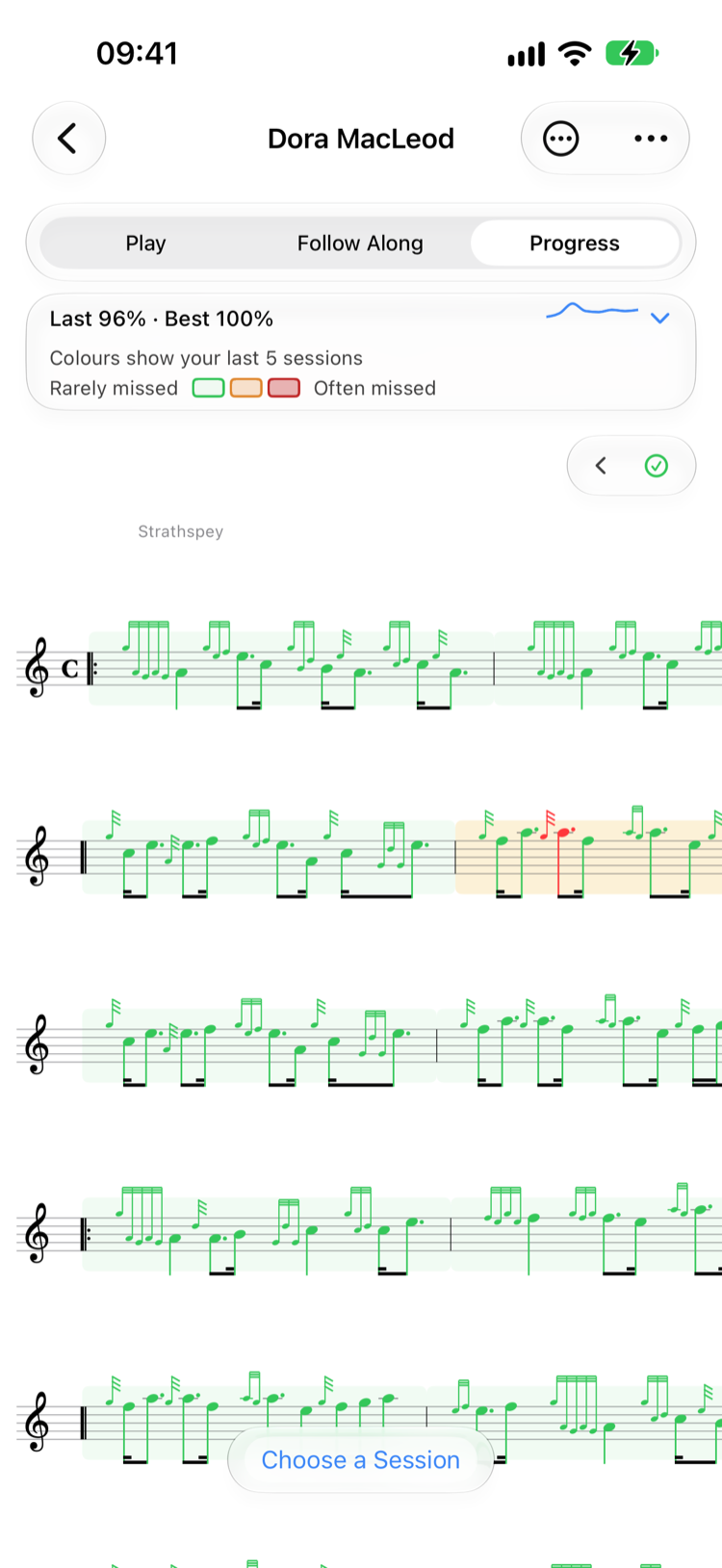
Once you've played a tune with Follow Along, Progress joins Play and Follow Along as a third way to look at it. Every bar is shaded by how your last five runs went, from pale green for the bars you play solidly through yellow to red for the ones you miss most, with a key that explains the shading, and each note is coloured by how it usually goes, so you can see exactly which gracenote lets you down. Runs you recorded before this version are scored the first time you open the tune's Progress.

Tap the little chart for your accuracy over time and your Most Missed Bars, then tap a bar to select it on the score and tap Practice to loop it with Follow Along. After each run you see how it stands against your best: a new best, level with it, or how far off.

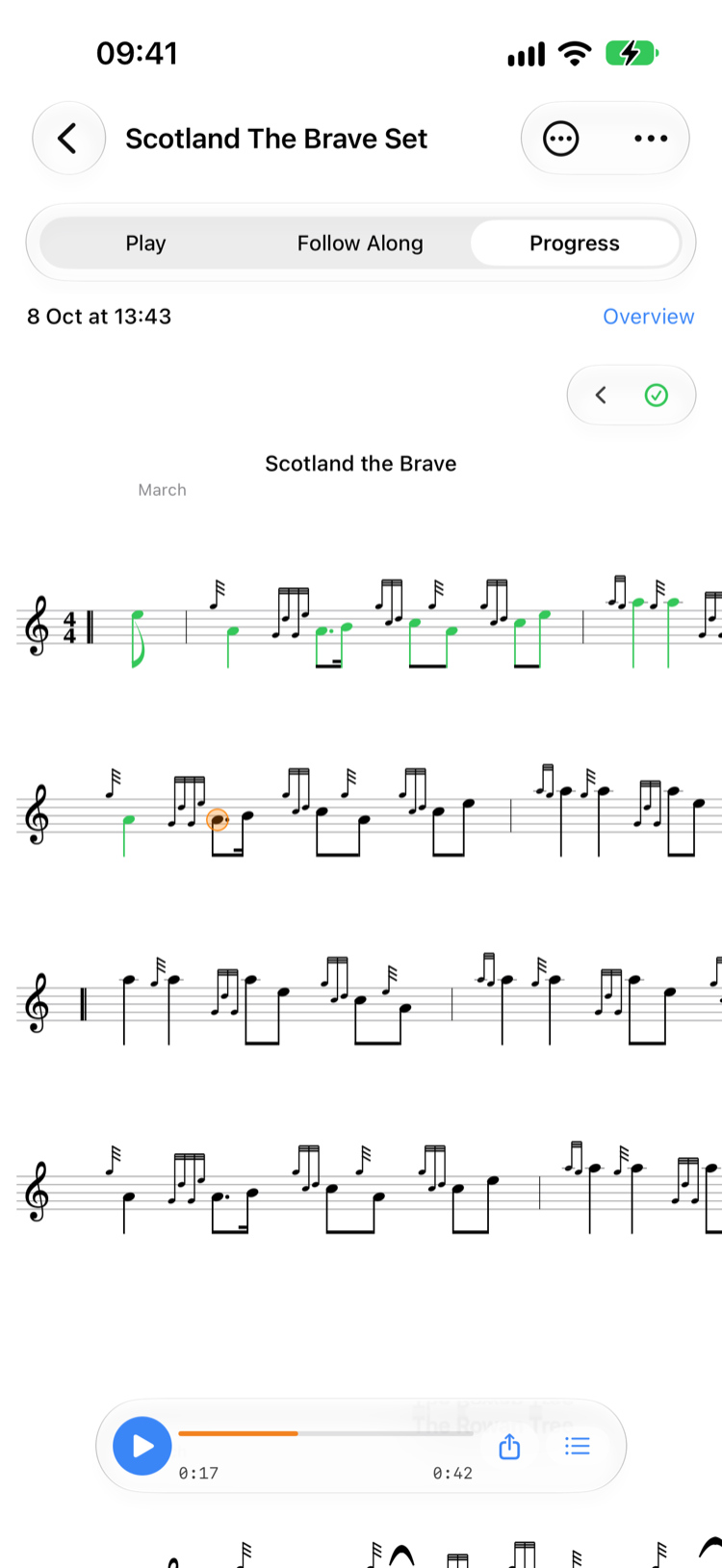
A recorded run played back on the score

Record Your Runs Premium

The first time you start Follow Along, Ultimate Piper asks whether to record your runs. Say yes and each run is kept, so Progress can show the bars you miss most and you can listen back to any of them. Recording starts with your first note and stops after 30 seconds without one, so drones, tuning and breaks aren't kept. Change it any time with Record Every Session in Settings.

After a run, the app listens back to the whole recording, so a run you played well is still marked right even if the live tracker lost its place. Choose a Session in Progress plays any run back on the score, and a gracenote you played to the wrong note is marked in yellow and tells you what you played.

Instrument calibration

Calibrate Your Instrument

Every chanter is different. Calibrate Ultimate Piper to your specific instrument by playing each note so the app learns your exact frequencies. Save profiles for multiple instruments and switch between them instantly. On the Mac, Calibrate Practice Chanter and Calibrate a New Instrument sit in the Playback menu.

Practice session detail

Session Detail Free

After each session, review exactly what you practised — which tunes, how long, and when — and keep a note on each tune as you go. Played with the band? Log the band practice afterwards. Logged something by mistake? Delete it. Build a detailed log of your musical journey that helps you stay accountable and motivated.

Practice insights and statistics

Practice Insights Free

A practice calendar and your streak sit at the top, with charts of your practice history, most practised tunes, and neglected pieces below. Follow Along runs count as practice too. Understand your habits, spot trends, and make every session count.

Practice loop

Practice Loop Free

Select any range of bars and loop them at adjustable tempo. Perfect for drilling tricky passages — turn on Auto + and the tempo rises by a step of your choosing on every pass, up to 200 BPM, building you up to full speed. On the Mac, the loop opens in its own window you can drag and resize while the tune stays in view.

Standalone metronome

Standalone Metronome Free

A full-featured metronome with authentic pipe band drum sounds — side drum, bass drum, and tenor drum — all tuned to your target Low A. Choose your time signature, toggle accent and subdivisions, and tap to set tempo. Also available on Apple Watch with Digital Crown BPM control and haptic taps, and as a built-in click track during follow-along mode. On the Mac it floats in its own window above the score.

Proficiency Levels

Track where you are with every tune using five levels. Set proficiency manually and use it to shape your practice sessions.

Smart Warm-up Suggestions

Ultimate Piper picks a few warm-up tunes at random from the ones you've rated Developing, Memorised or Mastered — tap Shuffle for a new set — so nothing slips through the cracks.

Focus Tunes & Tune of the Week

Mark the tunes you're working on as Focus and they're added to every practice session you start. Pick one Tune of the Week and it goes first in every session that week, so it gets consistent attention.

Daily Practice Reminders

Set a daily reminder at your preferred time. When it fires, your Focus tunes and warm-ups are lined up and waiting in Practice.

Works on iPhone, iPad, Mac, and Apple Watch

All your tunes, folders, practice sessions, and settings sync seamlessly via iCloud.

Requires iOS 26, iPadOS 26, macOS 26, or watchOS 26.1. Siri's own music, open and search routes, and the rhythm report after a recorded follow-along, need iOS 27 or macOS 27.